THIS BLOG IS UNDER PROGRESS.....

PLEASE KEEP VISITING FOR REGULAR UPDATES AND SUGGESTIONS ARE ALWAYS WELCOMED.

Thursday, March 25, 2010

FM Radio On Your Computer Indian Stations Too


Get all Popular INDIAN & Other International FM Radio Stations right on your PC. The Streaming is very fast even on slow connection. This is an exclusive release for DOWNLOADSNHACKS Users so dont miss this. The FM Stations List is given inside..


FM STATIONS LIST:

Redio mirchi 98.3 FM
Red FM 93.5
Trance radio DJ
SBS FM - Hindi
BombayBeats FM
Radio XL - UK
ApnaRadio - USA
DesiSoundz - India
City 101.6 FM - Dubai
Sunrise FM - UK
Sanskar Radio - UK
BBC News
Radio City
RadioTeenTaal
Radio mska
radio mirchi
city 101.5 FM
crazy FM
Cloud FM - Lahore

MEDIAFIRE PASSWORD: bsms

--CLICK DOWNLOAD TO START DOWNLOADING FROM MEDIAFIRE--


Send Anonymous Email to anyone for free


Learn how to send an email messages anonymously and secretly so that recipient will never know who sent that message and from where.
There are many reasons to send an email anonymously, for example send an email to a friend when you have no access to your regular email account, or make fun of your enemy, etc. There are various websites from where you can send anonymous email. So am posting here some of the best sites which helps you to send anonymous email.
1. http://www.sendanonymousemail.net/ – Is a free service which allow you to send unlimitted anonymous email. It's one of the most popular anonymous email service on the net.

2. http://deadfake.com/Send.aspx - is a site that lets you send free fake emails to anyone you like. There’s no signup, no registration, no fuss. You can even send fake emails with rich text; fonts, colours, etc.

3. http://send-email.org/ - Useful site to quickly send an anonymous message.

4. http://anonymouse.org/anonemail.html - With AnonEmail it is possible to send e-mails without revealing your e-mail address or any information about your identity.

5. http://www.monkeys.com/formmailer/ - This website allows you to specify a sender’s address as well, allowing you to seemingly send it from a normal mail account.


These are some of the best websites which allows you to send free anonymous email messages. So if you have no access to your email account, or if you want to confess your love to somebody, or want to play an email joke with your friend... this websites surely will come in handy.

Enable checkboxes for selecting files in Windows Vista Explorer


You’re probably used to hit either CTRL or SHIFT to select multiple files (one by one or a consecutive bunch, respectively). However, if you accidentally misclick, your selection is lost and you have to start over.
This is would not happen if you’d be able to select files in a checkbox manner, would it?


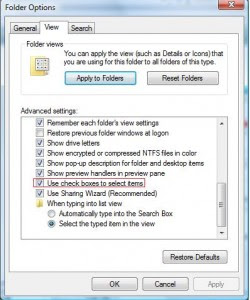
To implement the checkboxes, simply do this..
1.) Go to folder options
2.) Go to the View tab, scroll down under the Advanced Settings area and tick the option: Use checkboxes to select items
3.) When hovering over a file or folder in Explorer, a checkbox will now appear near it, allowing you to select that item.

Make all versions of XP n VISTA Genuine In one CLICK..!

Guys Today I'm posting the most simplest and the coolest method possible to make your fake windows genuine.
JUST FOLLOW THIS STEP BY STEP GUIDE TO M MAKE YOUR COPY OF WINDOWS GENUINE...

1]- Download the Licence Key.reg file from the given Mediafire link.
[Incase your antivirus detects this file as a virus, pls ignore it..coz trust me its not a virus.]

2]- Save it any where you like [preferably desktop.]

3]- Double click on it. You will see a prompt that will say 'are you sure you want to add.... info to registry..'

4]- Click on YES.
THATS IT..! YOU ARE THROUGH.
YOUR COPY OF WINDOWS IS GENUINE NOW..!
Whats more it works on both XP n VISTA...!
njoy..!


--DOWNLOAD [1 kb] MEDIAFIRE--
PASSWORD FOR MEDIAFIRE: bsms


PS: If any one wanna know how this method works then read this.. :
The provided method is what you say the Automatic method. If you wanna do it manually then follow these steps.. :

1]- Click "Run..." on your start menu, type "regedit" and press enter.
[The Registry Editor opens up, and you are presented with a long list of keys on the left.]

2]- Browse through the list to HKEY_LOCAL_MACHINE\SOFTWARE\Microsoft\Windows NT\CurrentVersion\WPAEvents.
On the right, you should see a stringz value named OOBETimer.
[ This is the activation stuff. If you change it, Windows will change it back within a few seconds. ]

3]- Whatever its value is, change it to FF D5 71 D6 8B 6A 8D 6F D5 33 93 FD.
4]- After you've changed it, right-click WPAEvents and choose "Permissions..."

5]- Under "Permissions..." for WPAEvents, Go into the Advanced settings.
UNCHECK "Inhereit from parent the permission entries that apply to child objects. Include these with entries explicitly defined here"

6]- When prompted what course of action to take from here, click "COPY"

7]- From there, Highlight the SYSTEM line, and click edit.
Deny all options, apply, and run a free copy of windows.

but this procedure was made simple in the AUTOMATIC method. Moreover I suggest all you to use the AUTOMATIC method instead of using this Cumbersome Manual method.

If you face any problems feel free to ask..

Disable Recent Documents History to Boot Windows Faster, Also Maintain Your Privacy

The Recent Documents folder on the Windows XP Start menu displays a list of files and documents that you most recently used. But if you are not using this feature, it is best to disable it since it will reduce the time it takes to boot Windows plus when you are sharing the computer, you won't leave any tracks behind.

Note: This work on Vista & 7 as well.


Here's how to disable the recent documents history:

1]- Type regedit in the Start/Run window.

2]- Navigate to HKEY_CURRENT_USER\Software\Microsoft\Windows\ CurrentVersion\Policies\Explorer.

3]- Create a new DWORD value, or modify the existing value of NoRecentDocsHistory by double clicking.

4]- Set the Data Value to 1. Save the value and close the registry editor.

The next time you start Windows, your recent documents folder would remain empty and won't track your open documents; Windows will Boot faster and all your sessions on the PC will have 100% privacy.

Assign a Permanent Drive Letter to USB Drive

If you have multiple pen drives you might have noticed that every time you put in your drive it will be assigned a different drive letter. This can be very annoying, when you trying to open files of pendrive from some software as recent drive letter is changed you have to change address again. So now here is one solution for this problem assign permanent letter to your USB pendrive. Its very simple just follow given steps:


1]- Go to Start and then Run.
2]- Type Compmgmt.msc and hit Enter. Computer Management console will open up.
3]- In the menu on the left select Disk Management under the storage tab. You will now see all of your drives/partitions in the right hand side panel.
4]- Right click the USB drive you want to assign a permanent letter to and select Change Drive Letter and Paths.
5]- Click on Change.
6]- Assign any drive letter you want and click OK
7]- It will give a warning-you can ignore it since there are hardly any programs that depend on USB drive letters. But at the end of the day its your call, whether to go for it or not.
8]- The final step is to select File > Save and save the file in the default directory. Close the Console and you are done.


Make Money Blogging with Blogadvertisingstore.com


We as Bloggers continuously look for new avenues to earn some dollars from our blogs. Blogadvertisingstore.com provides us an excellent way to do so through their paid to blog program. Keep reading to know more about this amazing service.

What is Paid Reviews?
Paid reviews is a program where we as Bloggers write reviews about products or websites or about anything that our client requires.

Now this is where Blogadvertisingstore.com comes in. They provide a platform for the clients and the Bloggers to provide solutions to each other. Thus the Bloggers make some money and the clients get advertisement for their products.
To become a part of Blogadvertisingstore.com your blog must satisfy some requirements such as Page Rank, the Alexa Ranking and some others. Once your blog is accepted you have to write reviews of a particular number of words having the required links and text. If your website or blog is very popular and has good numbers, then all the more better is that you will make even more money with this program. Getting paid for blogging is made easy with this site.
Blogadvertisingstore.com is a free service and its very easy to sign-up for it. The payments are sent to your Paypal account when they reach a minimum threshold value. Well they also have a blog that has some excellent articles for webmasters and other users to make their website popular, on advertising and some other nice reads as well. Their blog is one of my personal favorite.
So in a nutshell blogadvertisingstore.com is a very good option to earn some dollars for Bloggers rather than flooding their site visitors with pop up ads. Do try this excellent service once, I'm sure you wont be disappointed. Happy Blogging!